Pando vs Workflowy: the outliner with an agent inside
by Andreas Tissen · · updated
Workflowy invented what this whole category copies: one endless outline, zoom into any bullet, mirrors, tags, search. It is fifteen years old, polished, and calm. I am not going to pretend otherwise, because you have used it and you would notice.
TL;DR. If you never plug an AI agent into your outline, keep Workflowy. It is the more polished tool for the pure outlining job. The basics are the same in both. So if you want a Workflowy alternative on features alone, there is not much here for you.
The split is one thing. Workflowy's MCP server runs inside its desktop app, and that app has to stay open. It cannot touch notes at all. Pando's is a hosted URL. Your agent keeps working with your laptop shut, and it reads and writes the notes too.
At a glance
| Pando | Workflowy | |
|---|---|---|
| Agent access | Hosted MCP server. Claude, Claude Code or ChatGPT connects over OAuth, remembers in a branch you assign, and works in your whole outline, read and write or read only, while your laptop is shut | Local MCP server, in desktop beta since 21 July 2026. Seven tools, the desktop app has to stay running, and it cannot read or write notes at all |
| Free plan | 1,000 bullets, every feature, agents included, no card | 100 new nodes per month |
| Paid | Pro is not for sale yet; at the 1,000-bullet limit you get three months of Pro, on us | USD 8.99 a month, or USD 6.99 billed annually |
| Live sync | About one second, measured 979 ms on production (2026-08-22) | Yes, seconds |
| Import from Workflowy | OPML, whole tree in one file | its own OPML export |
| Ships | Weekly | Eight numbered releases in 2026, including Panes on 7 September and Tables on 30 June |
| Native apps | Web plus a phone-first PWA | Web, macOS, iOS, Android |
Where the two overlap
- One tree, infinite depth, and any bullet can become the page.
- Mirrors: the same bullet living in two places, edited in either.
- Tags, fast search, keyboard-first editing, checkboxes.
- Import and export without lock-in. Pando reads Workflowy's OPML directly: your whole tree moves over in one file.
If this list is your whole requirement, Workflowy is a fine place to stay.
Where they part
The server is awake when your laptop is not. Workflowy shipped a Local MCP server in desktop beta on 21 July 2026. Its own help page says it is only available in the desktop app. So the app has to be open for an agent to reach your outline. A scheduled agent, a cloud runner or Claude on your phone cannot reach it at all.
Its seven tools also leave notes alone. Notes are where most people keep the part an agent needs. Pando's server is a URL at pando.ink, reached over OAuth, and notes are just another field to it.
Checked 22 September 2026. Recheck it: Workflowy ships often, and this is the kind of gap that closes.
An agent gets a home, not a chat window. In Pando, Claude or ChatGPT connects over MCP and gets a bullet of your outline to remember in, and that bullet survives the end of every session. It also reaches your whole outline, read and write or read only, as you choose; every key is listed in the app, and you can revoke any of them. Your agent's Tuesday decisions are still there on Friday, in a tree you can read and edit. If you want the longer version of this pattern, Give your agent a memory walks through it.
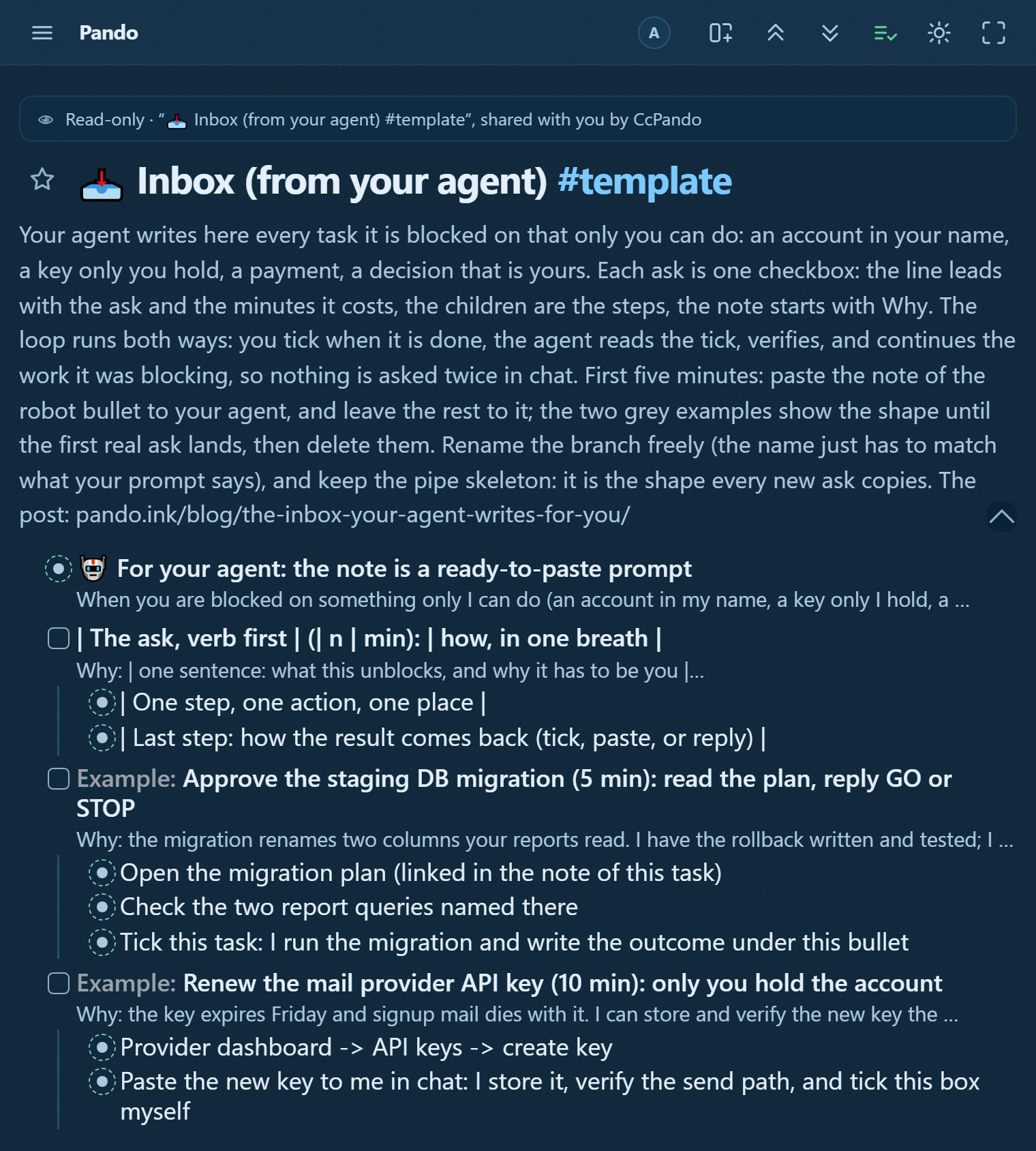
Delegation runs both ways. The pattern this product's own launch runs on: the agent works, hits the two or three things only a human can do, and writes them into your tree as checkboxes with the why in the note. You tick, it continues. No transcript to scroll back through. See The inbox your agent writes for you for the whole shape.
Live sync you can watch. A write on your phone is on your laptop in about a second (979 ms to the screen, measured 2026-08-22 against pando.ink; see the Dynalist comparison for the method), and when an agent writes, the bullet appears in front of you while its chip pulses in the top bar.
Structure beyond the list. A bullet can be a table or a board inside the outline: children become rows or columns, and the same data is a plain list again one keystroke later.
What Workflowy has that Pando does not
Fifteen years of polish, a larger team, native desktop apps, and a community that has answered every question twice. Pando is younger, and I would rather tell you that than paper over it.
And Workflowy is not standing still. Eight numbered releases in 2026: email into a node in March, Calendar sync in April, Tables on 30 June, Panes on 7 September. If you read somewhere that it stopped shipping, that was true once. It is not true now.
One more point in its favour. A local MCP server never sends your outline anywhere. Pando's is hosted. That is what makes it reachable from a phone, and it is also the trade. If you want nothing of yours on somebody else's machine, Workflowy made the right call and I did not.
Who each is for
- Stay on Workflowy if the outline is where you think alone, the polish is what you value, and no AI agent is going near your tree.
- Try Pando if you already work with an agent (or plan to) and you want the agent to file into your outline rather than fill your chat history. The agent inbox is the flagship pattern, and it is a two-minute setup on the shape below.
Try the shape before you move anything
Take the GTD template or any other shape from the gallery with one press of "Show in my Pando". If it holds, the importer takes your Workflowy tree whole: Settings, export as OPML, drop the file on Pando. Nothing is locked in either direction; export is one gesture, always.